Collection Manager
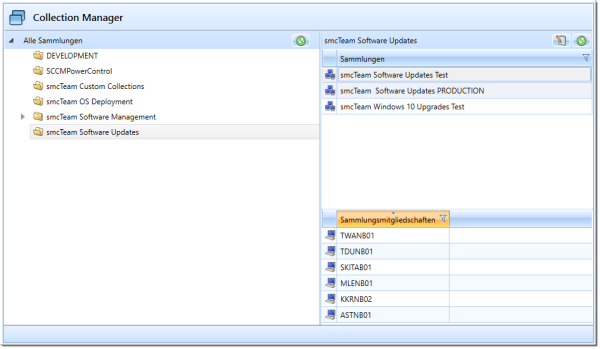
The “Collection Manager” plugin allows you to edit direct, include, and exclude membership rules for SCCM collections. The collections displayed in the plugin can be filtered using a global filter. Additionally, a root directory can be defined to simplify navigation within the collection structure.
Query Rule
Collections whose members are determined by a query rule cannot be edited directly using the “Collection Manager” plugin.
As a workaround, a separate collection with a query rule can be created. This can then be integrated into another collection using “Include Collection.” The integrated collection can then be edited using the “Collection Manager” plugin.
Plugin configuration
| Configuration entry | Description |
Default value |
| CommentFilterRegex | Regular expression used to filter the displayed collections. | .* |
| MaxUnsavedRules | Maximum number of rule changes that can be made without saving. For example, the number of computers that can be added to a collection at the same time. |
3 |
| NameFilterRegex | Regular expression used to filter the displayed collections. | .* |
| ObjectType | The object type to which it is assigned. | Device |
Default Plugin Integration
- Assembly: CollectionManagerPlugin
- Name: COLLECTION_MANAGER (to be translated)
- Icon: elements.png
- Argument: ID of a collection directory (can be selected using the button to the right of the menu)
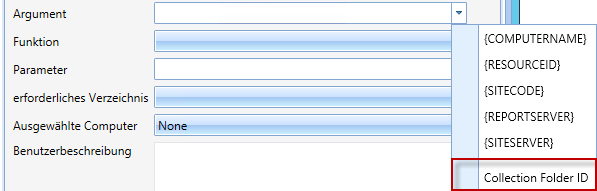
Supported Functions:
- SHUTDOWN: Shut down the selected computer.
- RESTART: Restart the selected computer.
- WAKEUP: Wake up the selected computer.