Client - Function Groups
Function groups are category elements to which functions/actions are assigned. You can create as many function groups as you like. An AD group can be assigned to each group.
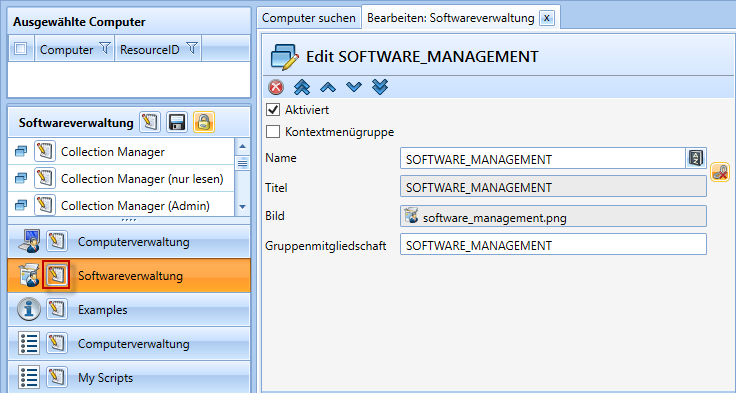
| Icon | Meaning | Functions |
  |
Move to the top / bottom |
Move the current function group to the top or bottom |
  |
Move up / down |
Move the current function group up or down |
 |
Delete |
Delete current function group |
 |
Create a language translation |
Create a translation for the entered name |
  |
Lock or set the title |
Enables/disables the ability to change the title |
| Attribute | Meaning |
| Enabled | Enable/disable current action |
| Context menu group |
This causes the group to appear as a context menu item within the computer search (in SCCM Manager's normal mode, this group will no longer be displayed in the left pane). |
| Name |
Displayed name |
|
Title |
Title name |
|
Picture |
Displayed image |
|
Group membership |
The user group that is allowed to access this action; if this field is left blank, anyone with access to the parent function group can access the action. |