Computer Cache
Description
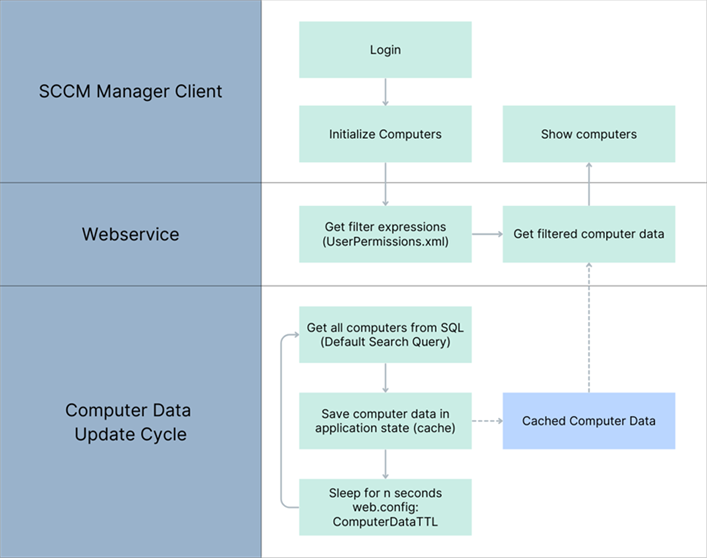
There is a new version in which the list of all computers (as defined by the “Default Query” configuration in UserPermissions.xml) is permanently kept in memory and updated every n seconds (web.config: ComputerDataTTL).
When the computer list is retrieved, only the user's permissions are queried, and a filtered version of the complete list is returned. Consequently, there is no longer an SQL query when the SCCM Manager client starts (and the associated wait time); instead, a list that is at most n seconds old is returned immediately.
Thanks to the latest update of the Client Creator plugin, users can still work with newly created clients even if the computer list has not yet been updated.
The new behavior is configurable and can be enabled via the web.config setting EnableComputerDataCache.
In addition, a new setting (web.config: EnableSqlQueryLogging) has been added to enable or disable SQL query logging. In normal operation, this helps reduce log file clutter.
Configuration
The configuration of UserPermissions.xml is slightly different in caching mode:
- The default query always serves as the basis
- The collection query must return only the [CollectionID] and [ResourceID] columns
- Under “Computer Search Queries”, SQL queries are no longer specified; only filter conditions are used
Example:
The default query remains unchanged. The collection query returns the total number of all possible collection–ResourceID mappings. {COLLECTION_VIEW} is programmatically replaced with the found CollectionIDs, e.g., DE1002B4, DE1002B8 (see <ComputerSearchCollections>)
<Setting Name="CollectionSearchQuery">
      SELECT
            CollectionID, ResourceID
      FROM
             v_FullCollectionMembership
      WHERE
            ResourceType = 5
      AND
            CollectionID IN ({COLLECTION_VIEW})
</Setting>

<ComputerSearchCollections>
      <Collection ID="DE1002B4" RequiredGroupMembership="DEVMSC\G-A-TEST01-Admins" />
      <Collection ID="DE1002B8" RequiredGroupMembership="DEVSMC\G-A-TEST02-Admins" />
</ComputerSearchCollections>

Unter ComputerSearchQueries werden keine ganzen SQL-Queries mehr angegeben, sondern nur noch Bedingungen zur Filterung der Computer vom Default Query:

<ComputerSearchQueries>
      <Query RequiredGroupMembership="DEVSMC\G-A-%-Admins">Organizational_unit LIKE '%/{0}/%'</Query>
      <Query RequiredGroupMembership="DEVSMC\G-B-%-Koordinatoren">Organizational_unit LIKE '%/{0}/%'</Query>
</ComputerSearchQueries>
Basically, all you need to know is that only filter conditions need to be specified under <ComputerSearchQueries>. The Collection Query can be used as described above.
New web.config entries
-
EnableComputerDataCache
-
EnableSqlQueryLogging
-
ComputerDataTTL