Client - User Interface
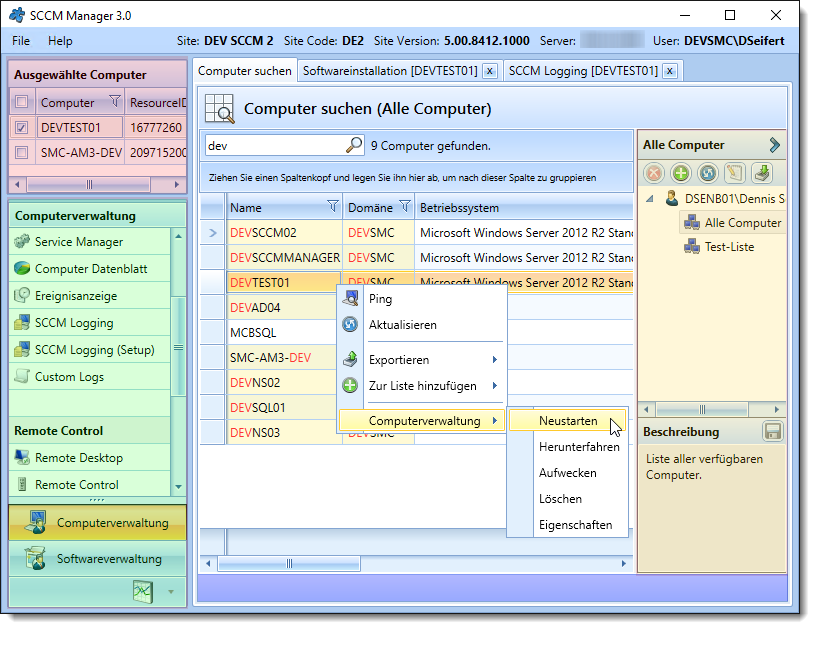
The user interface is divided into the Computer Selection (red), Functions and Function Groups (green), and the Workspace sections. The header also displays various details about the connected site. Additional status information is shown at the bottom in the footer (dark blue). Any plugins that have been launched are displayed as tabs in the workspace. This allows you to work with multiple plugins simultaneously. There is also a menu at the top. Here, you can change the user-specific language settings. You can also open an About dialog, which provides various details regarding the program version and license. Within the “Search for Computers” tab, there is also a computer list editor on the right-hand side that can be shown or hidden.
Switch connection
If multiple instances of the SCCM Manager have been installed, you can switch the connection via the menu item [File] → [Logout]. If the client was started with the -login parameter, you can enter your username and password in the subsequent dialog box.
Export formats
Some plugins, as well as the computer search, support data exports to the following formats:
- EXCEL: Excel-compliant file in the XLSX format.
- CSV: A comma-separated file in CSV format.
- HTML: Web-compliant HTML file.
- TEXT: A tab-delimited file in TXT format.