Certificates
This inventory class can be used to read certificates and store them in WMI.
 |
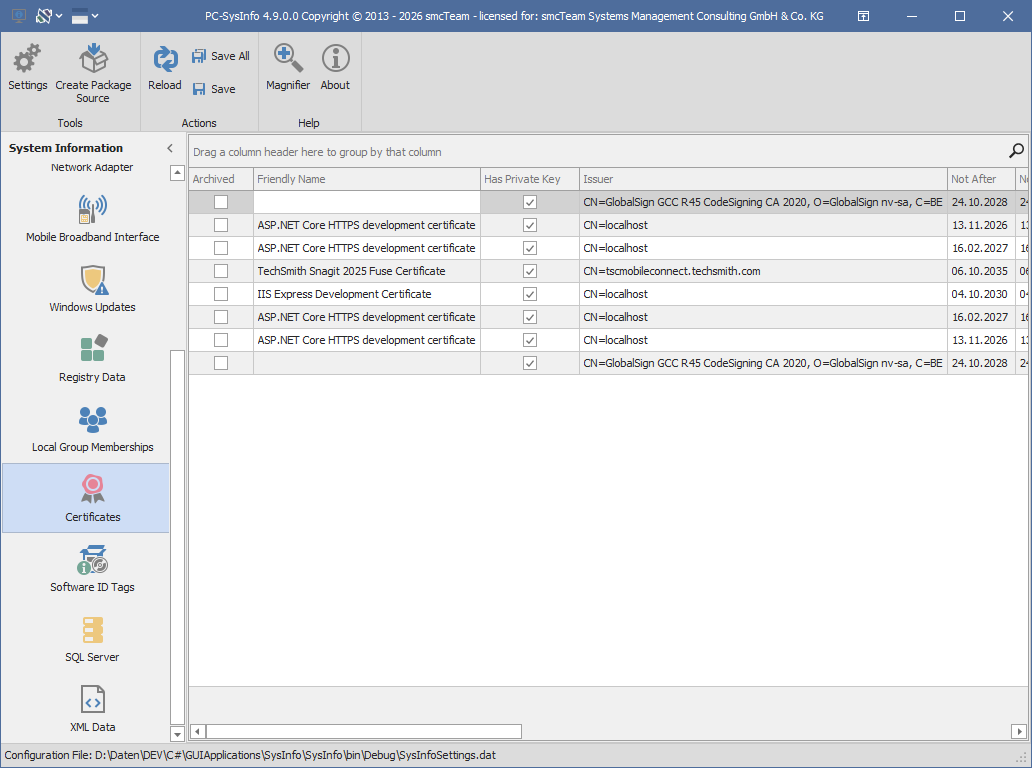
First, select the inventory class Certificates in the area of System Information on the left side. All reported values will be displayed. |
The following table describes the individual controls of the main menu and their functions.
 |
Within the Skin Gallery, different skins and color palettes can be selected to adjust the look and feel to your preferences. The corresponding controls are located in the header section of the application at the top left. |
 |
The Button Settings opens the configuration settings. |
 |
Create Package Source copies the files that are needed when using PC-SysInfo in connection with a systems management environment. For example, those provided files can be used to create a package. This option is only available while holding a valid license. |
 |
The Reload button refreshes the XML data list.
|
|
|
With the Buttons Save or Save All, the results of the selected class or the results of all inventory classes can be stored1 in the WMI repository. |
 |
Magnifier displays a magnifying glass that can be used to zoom in on any portion of the screen. |
 |
About displays further information about PC-SysInfo. |


Switching inventory classes on and off, as well as customizing the name space and the WMI class, is described in the chapter configuration.
The following table describes the properties of the inventory class Certificates.
| Name |
Type |
Key |
Array |
Description |
| GUID | String | ✅ | Internal unique identifier of the certificate. | |
| Archived | Boolean | Indicates whether the certificate is archived. | ||
| Friendly Name | String | The display name of the certificate. | ||
| Has Private Key | Boolean | Indicates whether the certificate has a private key. | ||
| Issuer | String | The issuer of the certificate. | ||
| Not After | DateTime | The date and time until which the certificate is valid. | ||
| Not Before | DateTime | The date and time from which the certificate is valid. | ||
| Serial Number | String | The serial number of the certificate. | ||
| Signature Algorithm | String | The display name of the algorithm used to sign the certificate. | ||
| Subject | String | The applicant or holder of the certificate. | ||
| Thumbprint | String | The unique thumbprint of the certificate. | ||
| Version | Integer | The version number of the certificate format. |