Web Service - Permissions
The “UserPermissions.xml” file defines permissions for the visibility of computer objects in SCCM Manager. This feature must be explicitly enabled in the web service configuration using the ComputerFilterEnabled setting. (See the Web Config chapter) The file is located in the web service configuration directory:
{Installation path}\Resources\SecurityConfiguration\UserPermissions.xml
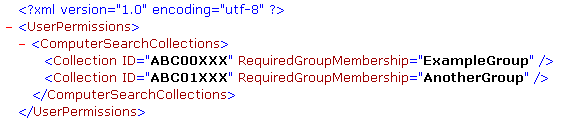
You can specify multiple search collections and set a user group permission for each one. In the example above, a user from the ExampleGroup group can view all computer objects in the collection with the ID ABC0XXX