Web Service - Credentials
The “Credentials.xml” file contains login credentials for authenticating with clients. These credentials are only used if the value for UseCredentials has been set to True in the web service configuration. (See the Web Config chapter) The file is located in the configuration directory:
{Installation path}\Resources\SecurityConfiguration\Credentials.xml
This functionality is required when communication needs to take place across domains or when the server is not registered as a local administrator on the clients to be managed. One user with administrator privileges can be specified per domain. The password is stored in encrypted form. The included “Password Encryptor” tool is required for this.
When specifying multiple domains, a fallback domain should always be specified. The user data for this domain is always used when the web service attempts to authenticate with a client located in a domain for which no explicit user data has been defined.
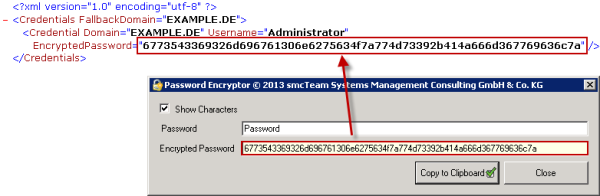
The password is automatically encrypted when you enter it. You can then copy it and paste it into the corresponding field in the “EncryptedPassword” parameter in the configuration file.