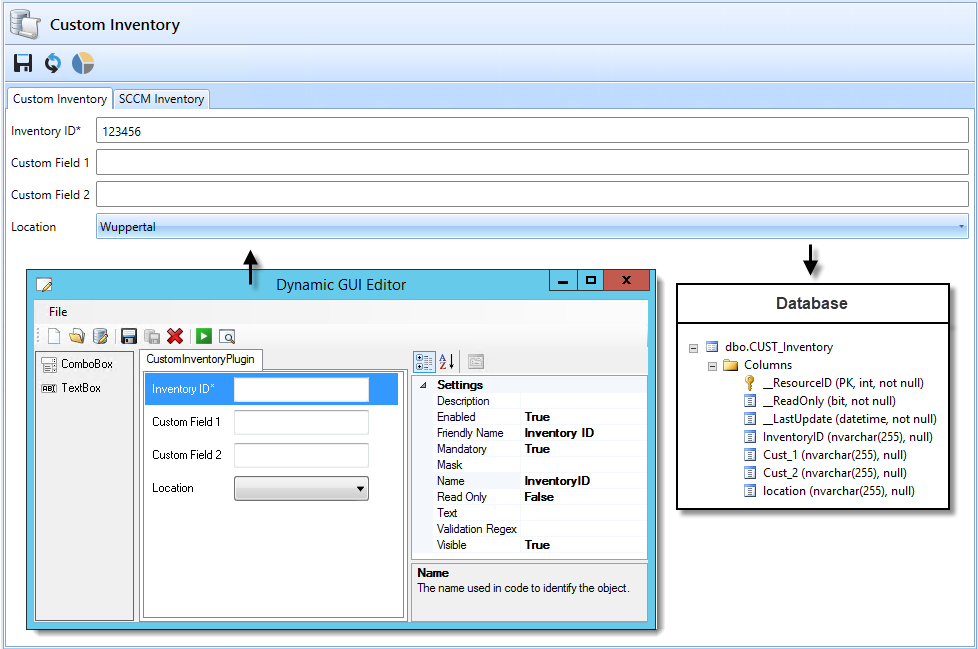
| InventoryQuery |
Sets the view for the SCCM Inventory tab
|
Click to view
SELECT DISTINCT
        sys.Name0 'Machine'                                                                                                  ,
        sys.ResourceID                                                                                                       ,
        sys.AD_Site_Name0 'ADSite'                                                                                           ,
        CS.UserName0 'User Name'                                                                                             ,
        CASE WHEN U.TopConsoleUser0 = '-1' OR      U.TopConsoleUser0 IS NULL THEN 'N/A' ELSE U.TopConsoleUser0 END AS TopUser,
        REPLACE (OS.Caption0, 'Microsoft Windows','Win')                                                              OS     ,
        REPLACE (OS.CSDVersion0,'Service Pack','SP') 'Service Pack'                                                          ,
        CS.Manufacturer0 'Manufacturer'                                                                                      ,
        CS.Model0 Model                                                                                                      ,
        BIOS.SerialNumber0 'Serial Number'                                                                                   ,
        BIOS.ReleaseDate0       AS BIOSDate                                                                                        ,
        BIOS.SMBIOSBIOSVersion0 AS BIOSVersion                                                                                     ,
        (
                SELECT
                        CONVERT(DATE,sys.Creation_Date0)) 'Managed Date',
        SUM(ISNULL(RAM.Capacity0,0)) 'Memory (MB)'                      ,
        COUNT(RAM.ResourceID) '# Memory Slots'                          ,
        REPLACE (cs.SystemType0,'-based PC','') 'Type'                  ,
        SUM(D.Size0) / 1024                                                                                                                                                                                                        AS 'Disk Size GB'                           ,
        CASE SE.ChassisTypes0 WHEN '1' THEN 'Other' WHEN '2' THEN 'Unknown' WHEN '3' THEN 'Desktop' WHEN '4' THEN 'Low Profile Desktop' WHEN '5' THEN 'Pizza Box' WHEN '6' THEN 'Mini Tower' WHEN '7' THEN 'Tower' WHEN '8' THEN 'Portable' WHEN '9' THEN 'Laptop' WHEN '10' THEN 'Notebook' WHEN '11' THEN 'Hand Held' WHEN '12' THEN 'Docking Station' WHEN '13' THEN 'All in One' WHEN '14' THEN 'Sub Notebook' WHEN '15' THEN 'Space-Saving' WHEN '16' THEN 'Lunch Box' WHEN '17' THEN 'Main System Chassis' WHEN '18' THEN 'Expansion Chassis' WHEN '19' THEN 'SubChassis' WHEN '20' THEN 'Bus Expansion Chassis' WHEN '21' THEN 'Peripheral Chassis' WHEN '22' THEN 'Storage Chassis' WHEN '23' THEN 'Rack Mount Chassis' WHEN '24' THEN 'Sealed-Case PC' ELSE 'Undefinded' END AS 'PC Type'
FROM
        v_R_System SYS
INNER JOIN
        (
                SELECT
                        Name0,
                        MAX(Creation_Date0) AS Creation_Date
                FROM
                        dbo.v_R_System
                GROUP BY
                        Name0 ) AS CleanSystem
ON
        SYS.Name0          = CleanSystem.Name0
AND     sys.Creation_Date0 = CleanSystem.Creation_Date
LEFT JOIN
        v_GS_COMPUTER_SYSTEM CS
ON
        sys.ResourceID=cs.ResourceID
LEFT JOIN
        v_GS_PC_BIOS BIOS
ON
        sys.ResourceID=bios.ResourceID
LEFT JOIN
        (
                SELECT
                        A.ResourceID,
                        MAX(A.[InstallDate0]) AS [InstallDate0]
                FROM
                        v_GS_OPERATING_SYSTEM A
                GROUP BY
                        A.ResourceID ) AS X
ON
        sys.ResourceID = X.ResourceID
INNER JOIN
        v_GS_OPERATING_SYSTEM OS
ON
        X.ResourceID   =OS.ResourceID
AND     X.InstallDate0 = OS.InstallDate0
LEFT JOIN
        v_GS_PHYSICAL_MEMORY RAM
ON
        sys.ResourceID=ram.ResourceID
LEFT OUTER JOIN
        dbo.v_GS_LOGICAL_DISK D
ON
        sys.ResourceID = D.ResourceID
AND     D.DriveType0   = 3
LEFT OUTER JOIN
        v_GS_SYSTEM_CONSOLE_USAGE_MAXGROUP U
ON
        SYS.ResourceID = U.ResourceID
LEFT JOIN
        dbo.v_GS_SYSTEM_ENCLOSURE SE
ON
        SYS.ResourceID = SE.ResourceID
LEFT JOIN
        dbo.v_GS_ENCRYPTABLE_VOLUME En
ON
        SYS.ResourceID = En.ResourceID
WHERE
        sys.ResourceID = {ResourceID}
GROUP BY
        sys.Creation_Date0                                                                                                                                                                                                        ,
        sys.Name0                                                                                                                                                                                                        ,
        sys.ResourceID                                                                                                                                                                                                        ,
        sys.AD_Site_Name0                                                                                                                                                                                                        ,
        CS.UserName0                                                                                                                                                                                                        ,
        REPLACE (OS.Caption0, 'Microsoft Windows','Win')                                                                                                                                                                                                        ,
        REPLACE (OS.CSDVersion0,'Service Pack','SP')                                                                                                                                                                                                        ,
        CS.Manufacturer0                                                                                                                                                                                                        ,
        CS.Model0                                                                                                                                                                                                        ,
        BIOS.SerialNumber0                                                                                                                                                                                                        ,
        REPLACE (cs.SystemType0,'-based PC','')                                                                                                                                                                                                        ,
        CASE WHEN U.TopConsoleUser0 = '-1' OR      U.TopConsoleUser0 IS NULL THEN 'N/A' ELSE U.TopConsoleUser0 END                                                                                                                                                                                                        ,
        CASE SE.ChassisTypes0 WHEN '1' THEN 'Other' WHEN '2' THEN 'Unknown' WHEN '3' THEN 'Desktop' WHEN '4' THEN 'Low Profile Desktop' WHEN '5' THEN 'Pizza Box' WHEN '6' THEN 'Mini Tower' WHEN '7' THEN 'Tower' WHEN '8' THEN 'Portable' WHEN '9' THEN 'Laptop' WHEN '10' THEN 'Notebook' WHEN '11' THEN 'Hand Held' WHEN '12' THEN 'Docking Station' WHEN '13' THEN 'All in One' WHEN '14' THEN 'Sub Notebook' WHEN '15' THEN 'Space-Saving' WHEN '16' THEN 'Lunch Box' WHEN '17' THEN 'Main System Chassis' WHEN '18' THEN 'Expansion Chassis' WHEN '19' THEN 'SubChassis' WHEN '20' THEN 'Bus Expansion Chassis' WHEN '21' THEN 'Peripheral Chassis' WHEN '22' THEN 'Storage Chassis' WHEN '23' THEN 'Rack Mount Chassis' WHEN '24' THEN 'Sealed-Case PC' ELSE 'Undefinded' END ,
        BIOS.ReleaseDate0                                                                                                                                                                                                        ,
        BIOS.SMBIOSBIOSVersion0
ORDER BY
        sys.Name0
|