Client Creator Service
The Client Creator Service is automatically installed along with SCCM Manager. The service processes the queue entries of the Client Creator plug-in; this process can be extended with plug-ins as needed.
Configuration file
Some basic settings for the service can be configured in {SCCM Manager installation path}\Services\Client Creator Queue\AppConfig.xml.
Normally, this file does not need to be configured, as all configurations are performed during installation.
| Parameter | Explaination |
| Web Service URL | Web Service URL The URL for the SCCM Manager web service. |
| Web Service Use Credentials | Here you can change the user context used to access the web service. By default, the setting is “False,” and the computer context (Local System) is used. If necessary, you can change this user context. For more information, see “Use your own credentials.” |
| Configuration Instance | Selected configuration instance in SCCM Manager. |
| Log File | The path to the log file. |
| Logging Level |
Log level for the log file. There are three possible values: 1: Errors only 2: Errors and warnings 3: All |
| Event Logging Level | Logging level for the Windows Event Viewer. There are three possible values. (See LoggingLevel.) |
Configuration database
After changes have been made to the configuration, the service must be restarted.
| Parameter | Explaination |
| QueueQuery | This query retrieves information about the queue |
Use Custom Credentials
If you want to use a user context other than the computer context (Local System) when connecting to the SCCM Manager web service, you can specify a different user.
To do this, you must first set the “Webservice use credentials” parameter to “True” in the configuration file (located at {SCCM Manager installation path}\Services\Client Creator Queue\AppConfig.xml) of the Client Creator Service.
Then, you must specify the credentials to be used for the user context.
To do this, start the “ClientCreatorService” application from the command prompt with the “-setcredentials” parameter.
The application is located at {SCCM Manager installation path}\Services\Client Creator Queue\}.

Common errors
This section lists and describes known issues and common errors.
Unable to start service...
Screenshot:
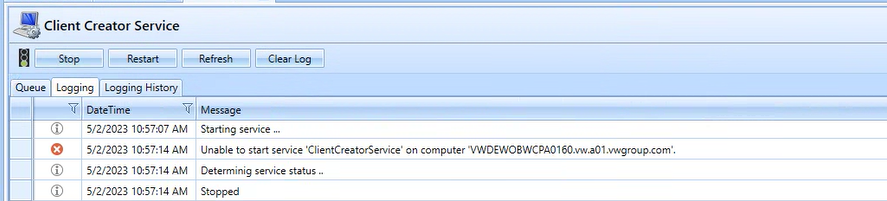
Cause/Solution:
Check the WebServiceURL in AppConfig.xml.