SQL Jobs (formally Scheduled Tasks)
This feature of the Asset Manager is only available if the logged-in user has the Administrator role.
Warning: The SQL editor used here differs from other SQL editors used within the Asset Manager in that SQL commands and functions such as ALTER, BULK, CREATE, DBCC, DECLARE, DELETE, DROP, EXECUTE, INSERT, TRUNCATE, and UPDATE. If used improperly, this can lead to the complete loss of databases.
The SQL commands PRINT and RAISEERROR are not supported.
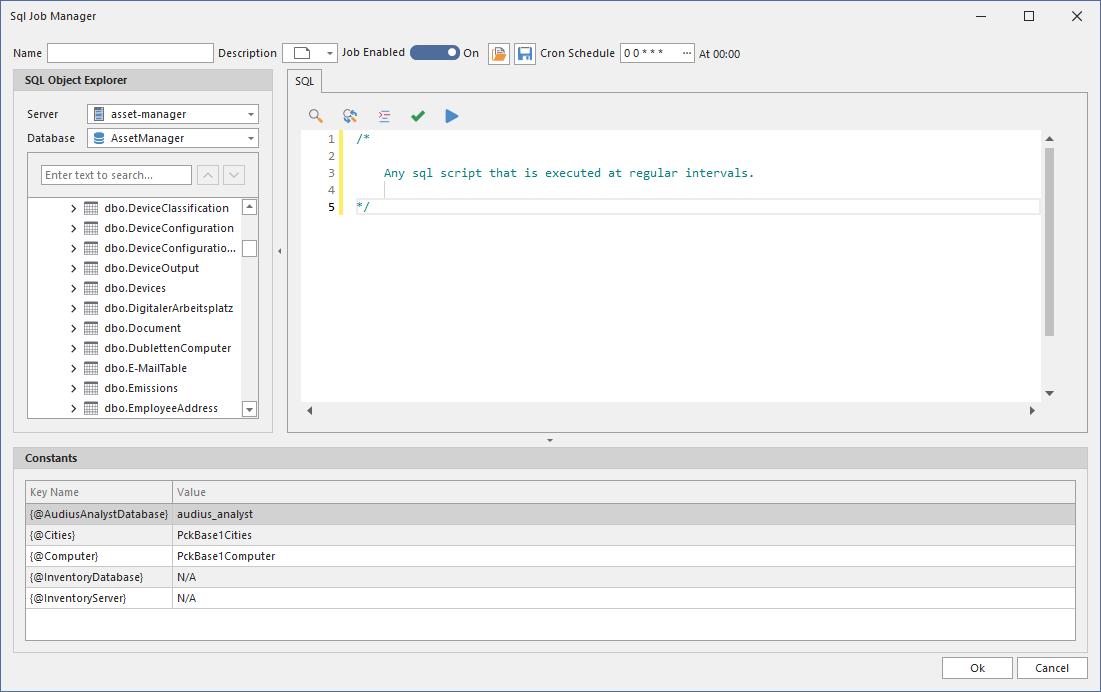
Recurring tasks can be performed within the Asset Manager using SQL jobs. This is based on an SQL script that is executed at regular intervals. A dialog is available for this purpose, which can be accessed using the ...
... button:
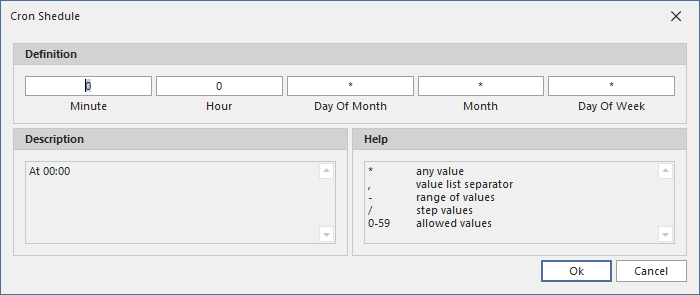
The time-based execution of a script is defined by so-called cron expressions. The expression always consists of five columns. It may not be immediately obvious, but it is common practice, especially in the Linux world, and can contain even complex schedules using just a few characters. There are several websites on the Internet, such as this one, where you can experiment with cron schedule expressions. However, the Asset Manager also has a dedicated editor that simplifies the input process: